
If your use case includes the live chat feature, the “Agent Report” provides a comprehensive view of your human agents’ performance.
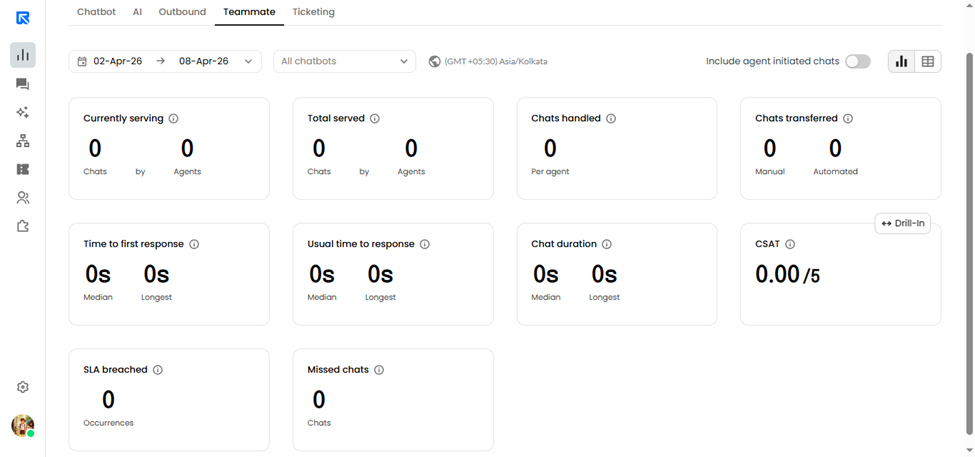
Here are the KPIs offered:
KPI | Description |
Currently Serving | Displays the total number of chats assigned and handled by all agents in real time. |
Total Served | Displays the total number of chats assigned to agents within the selected date range. We only consider those agents that had at least one chat assigned to them. |
Conversations handled | When a chat moves from Agent A to Agent B, it is recorded as a transfer. This KPI reflects the total number of transfers initiated by each agent. |
Time to first response | The time it takes for an agent to send the first message to the visitor after a chat is assigned to them. We showcase both the Longest time to take to send the first response and the Average amount of time it took to send the first response. |
Usual time to response | The time it takes for an agent to send a response to every message sent by the visitor. We showcase both the Longest time to take to send a response and the Average amount of time it took to send a response. |
Conversation duration | This is the total time spent on a conversation from the moment it is assigned to an agent until it is closed either manually by the agent or automatically due to a time-out. We display both the longest and average duration of conversations to give insight into handling time. |
CSAT | At the end of the chat, the chatbot asks the user to submit their feedback for that conversation in the form of a 5-star rating scale. We showcase all possible values like 1-star, 2-star along with an average rating. |
Missed Chat | It represents or displays the number of chats that were assigned to a human agent but close due to no response given by the Agents. This KPI is useful for tracking missed opportunities in customer engagement and ensuring timely responses from support agents. Note: Unassigned chats are also included in the Missed Chat count. |
You can view the KPIs as a summary at an account level or at a per-agent level by changing the modes.
All data is shown according to your account's time zone. You can export the agent report by clicking on the "Export data" button.