Manage Email Unsubscription with confirmation page and category-based groups directly from the Send Email action block
ReplyCX Email Unsubscription Page is a feature that displays a branded confirmation page when a recipient clicks the unsubscribe link in an email. Instead of instantly removing a user, the platform first asks for their explicit consent - helping reduce accidental Unsubscription and keeping your email engagement healthy.
Where to Find This Feature:
This feature is configured inside the Send Email action block in your workflow builder.
To access it:
Open your desired Outbound conversational workflow in ReplyCX.
Click on the “Send Email” action block.
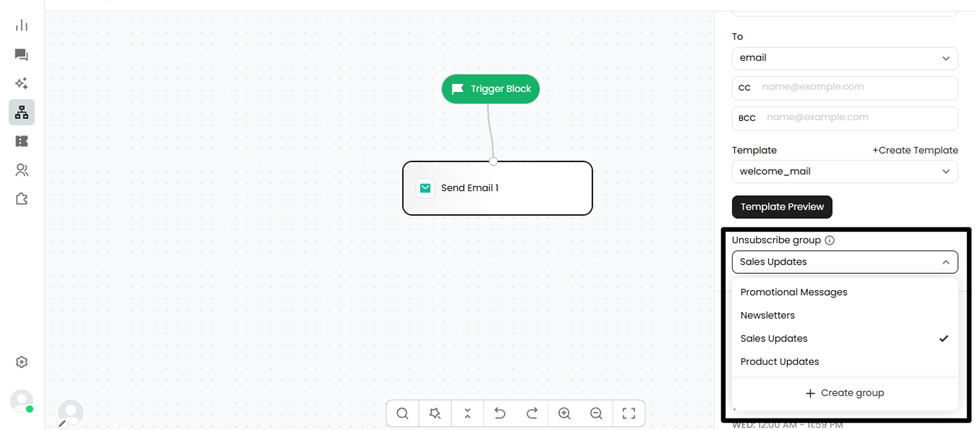
Inside the block settings, look for the “Unsubscribe Group” option.
Create a new group or assign an existing one to the email campaign.
How It Works for Recipients:
When a recipient clicks the unsubscribe link in an email:
They are taken to the branded confirmation page.
They are asked to confirm whether they want to unsubscribe from all future emails or subscribe to only from specific categories.
Their preference is saved accordingly.
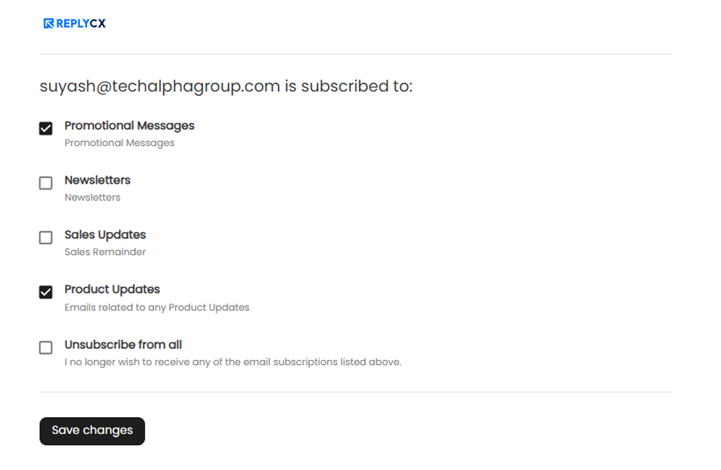
This ensures users don't unsubscribe accidentally and fully understand the action they're taking.
Note:
This feature is specifically used for Techalpha Marketing emails.