Setting up the block and configuration:
-
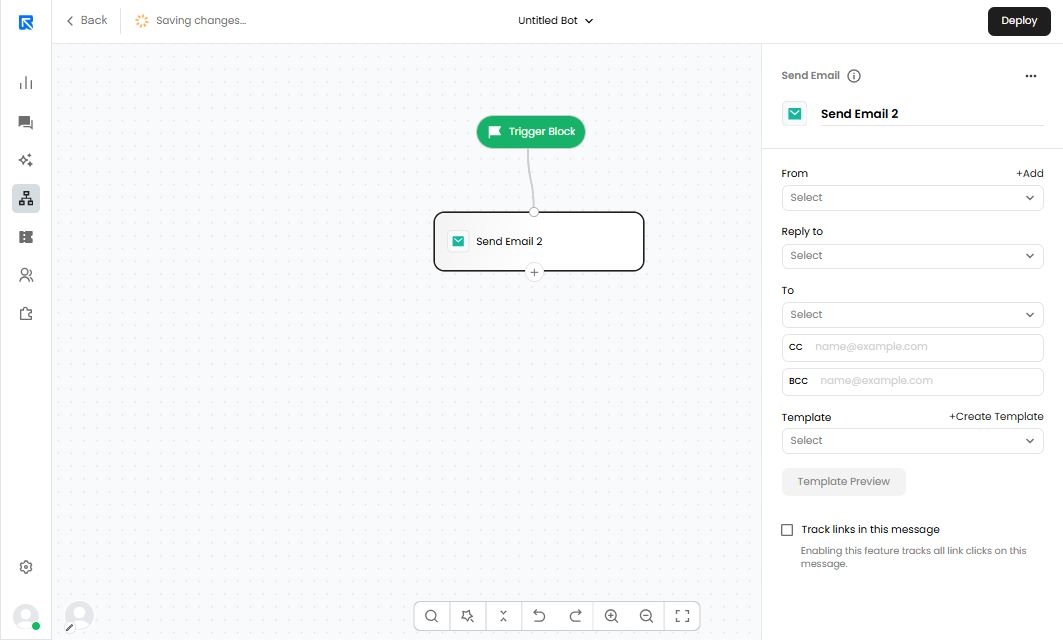
Start by adding the action block on canvas.
-
Click on Send SMS 1 block to open configuration panel on the right side of the screen.
-
Before setting up the block, you need to configure the WhatsApp channel.
-
API Configuration:
Go to Channel Configurations -> Email. Click on +Email Configuration to configure the
Email API then, fill the following details: -
Template Messages:
- ‘Add’, 'Edit' and ‘Remove’ templates.
- Status of the templates created and template creation details.
- Preview of the message template.
-
-
After all the configurations are done, go back to your outbound bot to further continue the configuration of the following details:
- From: Sender ID / Sender Email through which the email campaign will be sent.
- To: Reply back to the Sender Email.
- CC: Email IDs to be kept in CC.
- BCC: Email IDs to be included in BCC.
- Template: Content of the email to be sent.
- Template Preview: You can view the template to get an idea of the email created.
- Track links in this message: Enables link tracking on the message.