
# Image Support in AI Answer

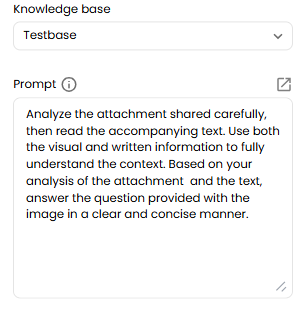
Users can now send images along with a supporting message, allowing the AI to analyse both the image and the text together to generate accurate and relevant responses. To make this work effectively, we need to prompt the AI to first analyse the image, then consider the accompanying text, and finally answer the question based on both inputs.
![](/files/Rr0pzSghlAeFoFcjcvhu)

**How It Works:**

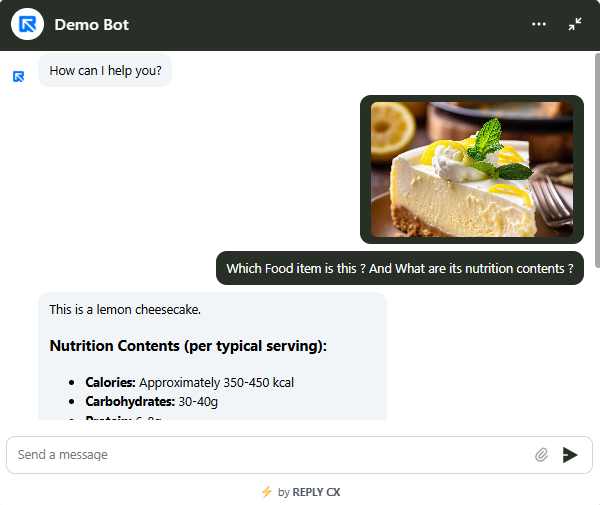
1. User uploads an image in the chat.
2. Add a message describing what you need or asking a question.
3. The AI reviews both the image and the message to provide a complete, contextual response.
4. Supported formats: image/jpeg /png /webp /gif
![](/files/Alvfqd7hzj2UAiSsG0JR)

> AI model analyse the images & text and based on both inputs, provides a balanced answer.


---

# Agent Instructions: Querying This Documentation

If you need additional information that is not directly available in this page, you can query the documentation dynamically by asking a question.

Perform an HTTP GET request on the current page URL with the `ask` query parameter:

```
GET https://help.reply.cx/ai-studio/image-support-in-ai-answer.md?ask=<question>
```

The question should be specific, self-contained, and written in natural language.
The response will contain a direct answer to the question and relevant excerpts and sources from the documentation.

Use this mechanism when the answer is not explicitly present in the current page, you need clarification or additional context, or you want to retrieve related documentation sections.
