
Authorization
All of ReplyCX's APIs use Bearer token-based authentication.
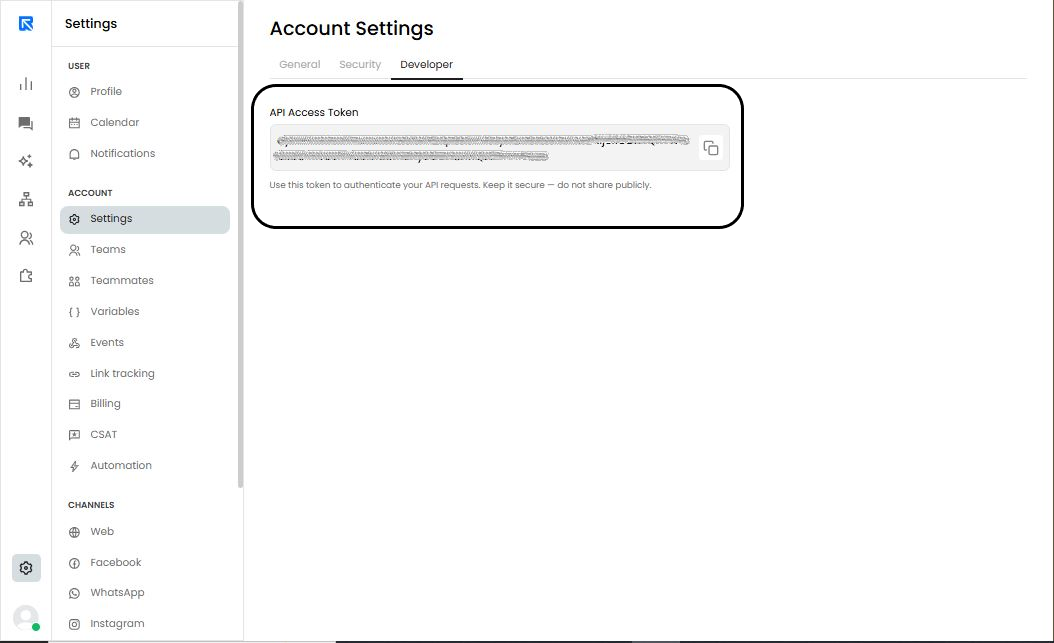
Your account token can be found at Settings 🡪 Account Settings 🡪 Developer.
Adding a data source to a knowledge base
POST /api/v1/ai/knowledge-base/<knowledge_base_id>/upload/sources
Using this API, you can add a data source to an existing knowledge base.
Headers:
| Name | Value |
|---|---|
| Content-Type | multipart/form-data |
| Authorization | Bearer <token> |
Body:
The API accepts files and text as multipart form data for upload. Each form field should be a unique key and contain either a file or text content.
Response:
200
{
"q1": [
{
"id": 330783,
"type": "text",
"name": "sample.txt",
"status": "in-progress",
"errors": null
},
{
"id": 330784,
"type": "text",
"name": "sample2.txt",
"status": "in-progress",
"errors": null
},
{
"id": 330785,
"type": "file",
"name": "File.pdf",
"status": "in-progress",
"errors": null
}
],
"d2": [
{
"id": 330786,
"type": "file",
"name": "File2.pdf",
"status": "in-progress",
"errors": null
}
],
"knowledge_base_id": 876,
"ok": true
}
400
{
  "ok": false,
  "error": "KNOWLEDGE_BASE_NOT_FOUND",
  "message": "KnowledgeBase Not Found in DB!",
  "code": "KNOWLEDGE_BASE_NOT_FOUND",
  "status": 404
}
{
  "ok": false,
  "error": "JWT_SIGNATURE_EXCEPTION",
  "message": "Invalid JWT token",
  "status": 401
}
{
  "ok": false,
  "error": "UNAUTHORIZED_FEATURE",
  "code": "UNAUTHORIZED_FEATURE",
  "status": 401,
  "message": "Please reach out to support to use this feature"
}
{
  "ok": false,
  "error": "ACCOUNT_DETAILS_NOT_FOUND",
  "code": "ACCOUNT_DETAILS_NOT_FOUND",
  "status": 404,
  "message": "Account Details are Not Found!"
}
{
  "ok": false,
  "error": "BAD_REQUEST",
  "code": "BAD_REQUEST",
  "status": 400,
  "message": "Knowledge base does not belong to the account(876)"
}
Get training status of a data source:
GET /api/v1/ai/status/sources
Using this API, you can fetch the status of one or more data sources in a knowledge base to know it its training is - in progress / completed / failed.
Headers:
| Name | Value |
|---|---|
| Content-Type | application/json |
| Authorization | Bearer <token> |
Body:
| Name | Type | Descriptions |
|---|---|---|
| source_ids | query params | Comma-separated list of data source IDs to be passed as query params. |
Response:
200
{
    "sources": [
        {
            "id": 330778,
            "name": "sample.txt",
            "status": "in-progress",
            "knowledge_base_id": 876
        }
    ],
    "ok": true
}
400
{
"ok": false,
"error": "JWT_SIGNATURE_EXCEPTION",
"message": "Invalid JWT token",
"status": 401
}{ "ok": false,
"error": "UNAUTHORIZED_FEATURE",
"code": "UNAUTHORIZED_FEATURE",
"status": 401,
"message": "Please reach out to support to use this feature"
}
{"ok": false,
"error": "ACCOUNT_DETAILS_NOT_FOUND",
"code": "ACCOUNT_DETAILS_NOT_FOUND",
"status": 404,
"message": "Account Details are Not Found!"
}
Creating a conversation:
POST /v1/conversations
Using this endpoint, you can start/create a new conversation.
Headers:
| Name | Value |
|---|---|
| Content-Type | application/json |
| Authorization | Bearer <token> |
Body:
Contains the message payload. Payload differs based on channel.
SMS
{
"channel": "SMS",
"from": "1-123-1231230",
"to": {
"phone": "1-1321231320",
"name": "John Doe",
"email": "abc@acme.com"
},
"message": {
"type": "text",
"text": "Hii"
},
"assignee": "assignee@reply.cx"
}
{
   "channel": "WHATSAPP",
   "from": "1123123123",
   "to": {
       "phone": "11231231230",
       "name": "John Doe",
       "email": "example@domain.com"
   },
   "message": {
       "type": "template",
       "data": {
           "template": "test_template",
           "parameters": {
               "header": [
                   "John"
               ],
               "body": [
                   "Doe",
                   "Doe2"
               ],
               "buttons": {
                   "copy_code": "123456",
                   "otp": "123456",
                   "url": "any"
               }
           },
           "variables":{
               "name": "John Doe"
           }
       }
   },
   "assignee": "example@domain.com"
}
Response:
200
{
"ok": true,
"conversation": {
"id": "12wfegrgt4t",
"message_id": "sdvgret4353b",
"created_at": "",
"assignee": {
"id": 123,
"to": "abc@acme.com"
}
},
"contact": {
"id": "11111111",
"name": "John Doe",
"phone": "1234567890",
"email": "example@domain.com"
}
}
400
{
  "ok": false,
  "error": "CHANNEL_TOKEN_EXPIRED",
  "code": "CHANNEL_TOKEN_EXPIRED",
  "message": "Token used to configure the channel is expired. Please reconfigure the channel.",
  "status": 400
}
{
"ok": false,
"error": "CONVERSATION_CREATION_EXCEPTION",
"code": "CONVERSATION_CREATION_EXCEPTION",
"message": "Conversation is not created. Please try again after some time.",
"status": 400
}
{
"ok": false,
"error": "CHANNEL_NOT_ENABLED",
"code": "CHANNEL_NOT_ENABLED",
"message": "This channel is not enabled in the account.",
"status": 400
}
{
"ok": false,
"error": "CONTACT_IS_BLOCKED",
"code": "CONTACT_IS_BLOCKED",
"message": "Conversation cannot be created for blocked contact.",
"status": 400
}
{
"ok": false,
"error": "CONTACT_IS_BLOCKED",
"code": "CONTACT_IS_BLOCKED",
"message": "Conversation cannot be created for blocked contact.",
"status": 400
}
{
"ok": false,
"error": "CONTACT_IS_BLOCKED",
"code": "CONTACT_IS_BLOCKED",
"message": "Conversation cannot be created for blocked contact.",
"status": 400
}
{
"ok": false,
"error": "CONVERSATION_NOT_CREATED",
"code": "CONVERSATION_NOT_CREATED",
"message": "Conversation is not created due to user limit validation",
"status": 400
}
401
{
   "error": "JWT_SIGNATURE_EXCEPTION",
   "message": "Invalid JWT token",
   "ok": false,
   "status": 401
}
404
{
  "ok": false,
  "error": "PHONE_NUMBER_IS_NOT_CONFIGURED",
  "code": "PHONE_NUMBER_IS_NOT_CONFIGURED",
  "message": "’From’ phone number is not configured in the account.",
  "status": 404
}
{
"ok": false,
"error": "WHATSAPP_TEMPLATE_NOT_FOUND",
"code": "WHATSAPP_TEMPLATE_NOT_FOUND",
"message": "WhatsApp template is not available in the account.",
"status": 404
}
{
"ok": false,
"error": "TEMPLATE_NOT_APPROVED",
"code": "TEMPLATE_NOT_APPROVED",
"message": "Oops, template is not approved",
"status": 404
}
Send agent response to a conversation
POST /api/v1/conversation/<conversation_id>/messages
For every response sent by the agent on the third-party system, this API is to be invoked so it can relay this response to the user.
Headers:
| Name | Value |
|---|---|
| Content-Type | application/json |
| Authorization | Bearer <token> |
Body:
Text
{
"message": {
"text": "Helo there!",
"type": "text"
},
"user": {
"by": "example@domain.com"
}
}
File
{
  "message": {
    "file": {
      "path": "https://replycx-conversation-attachment-dev.storage.googleapis.com/476/476_13228_NmYx9WnmRh2D054745777092FIaVpzP2_attachment.jpg",
      "size": 152146,
      "type": "image/jpeg",
      "name": "Orchid - 5.jpg"
    },
    "type": "file"
  },
  "user": {
    "by": "example@domain.com"
  }
}
Voice
{
  "message": {
    "file": {
      "path": "https://replycx-conversation-attachment-dev.storage.googleapis.com/476/476_13228_NmYx9WnmRh2D054745777092FIaVpzP2_attachment.jpg",
      "size": 152146,
      "type": "image/jpeg",
      "name": "Orchid - 5.jpg"
    },
    "type": "voice"
  },
  "user": {
    "by": "example@domain.com"
  }
}
Template Message
{
  "message": {
    "data": {
      "template": "template_1"
    },
    "type": "template"
  },
  "user": {
    "by": "example@domain.com"
  }
}
Response:
200
{
  "ok": true,
  "message_id": "6HRBshHEcV8P103039226478taGDJQxC"
}
400
{
  "ok": false,
  "error": "INVALID_DATA",
  "code": "INVALID_DATA",
  "message": "Error message",
  "status": 400
}
{
"ok": false,
"error": "CONVERSATION_CLOSED",
"code": "CONVERSATION_CLOSED",
"message": "Assignee cannot be changed on closed conversation.",
"status": 400
}
{
"ok": false,
"error": "CONVERSATION_ASSIGNED_TO_BOT",
"code": "CONVERSATION_ASSIGNED_TO_BOT",
"message": "Agent message cannot be sent on bot assigned conversation.",
"status": 400
}
{
"ok": false,
"error": "CONTACT_IS_BLOCKED",
"code": "CONTACT_IS_BLOCKED",
"message": "Conversation cannot be created for blocked contact.",
"status": 400
}
{
"ok": false,
"error": "MESSAGE_NOT_SENT",
"code": "MESSAGE_NOT_SENT",
"message": "Message is not sent due to user limit validation.",
"status": 400
}
401
{
  "ok": false,
  "error": "JWT_SIGNATURE_EXCEPTION",
  "code": "JWT_SIGNATURE_EXCEPTION",
  "message": "Invalid JWT token",
  "status": 401
}
404
{
"ok": false,
"error": "CONVERSATION_NOT_FOUND",
"code": "CONVERSATION_NOT_FOUND",
"message": "Conversation is not available.",
"status": 404
}
Closing a conversation:
POST /api/v1/conversation/{conversation_id}/events
Use this end point to open the conversation.
Headers:
| Name | Value |
|---|---|
| Content-Type | application/json |
| Authorization | Bearer <token> |
Body:
{
"event": "status",
"status": "CLOSE",
"user": {
"by": "assignee@reply.cx"
}
}
Response:
200
{
"ok": true
}
400
{
  "ok": false,
  "error": "CONVERSATION_NOT_CLOSED",
  "code": "CONVERSATION_NOT_CLOSED",
  "message": "Conversation is not closed due to user limit validation.",
  "status": 400
}
401
{
  "ok": false,
  "error": "JWT_SIGNATURE_EXCEPTION",
  "code": "JWT_SIGNATURE_EXCEPTION",
  "message": "Invalid JWT token",
  "status": 401
}
404
{
  "ok": false,
  "error": "CONVERSATION_NOT_FOUND",
  "code": "CONVERSATION_NOT_FOUND",
  "message": "Conversation is not available.",
  "status": 404
}
Changing assignee in a conversation:
POST /api/v1/conversation/{conversation_id}/events
Use this endpoint to change the assignee in an open conversation.
Headers:
| Name | Value |
|---|---|
| Content-Type | application/json |
| Authorization | Bearer <token> |
Body:
// Change from assignee to assignee
{
"event": "assignee",
"user": {
"by": "assignee_old@reply.cx",
"to": "assignee_new@reply.cx"
}
}
// Change from assignee to team
{
"event": "assignee",
"team": {
"by": "assignee@reply.cx",
"to": "Sales"
}
}
Response:
200
{
"ok": true
}
400
{
  "ok": false,
  "error": "TEAM_NOT_FOUND",
  "code": "TEAM_NOT_FOUND",
  "message": "Team does not exist.",
  "status": 400
}
{
"ok": false,
"error": "CONVERSATION_CLOSED",
"code": "CONVERSATION_CLOSED",
"message": "Assignee cannot be changed on closed conversation.",
"status": 400
}
{
"ok": false,
"error": "ASSIGNEE_CHANGE_EXCEPTION",
"code": "ASSIGNEE_CHANGE_EXCEPTION",
"message": "By and To user are same. Can not assign conversation to same user.",
"status": 400
}
{
"ok": false,
"error": "ASSIGNEE_NOT_CHANGED",
"code": "ASSIGNEE_NOT_CHANGED",
"message": "Assignee is not changed due to user limit validationt.",
"status": 400
}java
401
{
  "ok": false,
  "error": "JWT_SIGNATURE_EXCEPTION",
  "code": "JWT_SIGNATURE_EXCEPTION",
  "message": "Invalid JWT token",
  "status": 401
}
404
{
  "ok": false,
  "error": "CONVERSATION_NOT_FOUND",
  "code": "CONVERSATION_NOT_FOUND",
  "message": "Conversation is not available.",
  "status": 404
}
Update variable of a conversation:
POST /v1/accounts/{account_id}/conversations/{conversation_id}/variables
Use this endpoint to update the variables in the conversation.
Headers:
| Name | Value |
|---|---|
| Content-Type | application/json |
| Authorization | Bearer <token> |
Body:
{
"variables": [
{
"name": "name",
"type": "conversation",
"value": "John Doe"
},
{
"name": "phone",
"type": "contact",
"value": "9999999999"
},
{
"name": "company",
"type": "conversation",
"value": "ReplyCx"
},
{
"name": "email",
"type": "contact",
"value": "john.doe@gmail.com"
}
}
}
Response:
200
{
  "ok": true
}
400
{
    "ok": false,
    "message": {
        "variables": [
            "Shorter than minimum length 1."
        ]
    },
    "status": 400,
    "error": "BAD_REQUEST"
}
401
{
    "error": "UNAUTHORIZED",
    "ok": false,
    "status": 401,
    "message": "Invalid token. Provide the valid account token."
}
404
{
"message": "Conversation is not found",
"ok": false,
"error": "CONVERSATION_NOT_FOUND",
"code": "CONVERSATION_NOT_FOUND",
"status": 404
}
Set webhook URL for Events feature:
POST /v1/accounts/{account_id}/webhook
Use this endpoint to set webhook for receiving conversation related events from the account.
Headers:
| Name | Value |
|---|---|
| Content-Type | application/json |
| Authorization | Bearer <token> |
Body:
{
"webhook_url": "",
"subscribed_events": [
{
"key": "conversation_create",
"is_subscribed": true
},
{
"key": "message",
"is_subscribed": true
},
{
"key": "status",
"is_subscribed": true
},
{
"key": "assignee_change",
"is_subscribed": true
},
{
"key": "sla_breached",
"is_subscribed": true
},
{
"key": "variables",
"is_subscribed": true
},
{
"key": "conversation_labels",
"is_subscribed": true
},
{
"key": "note",
"is_subscribed": true
}
],
"is_enabled": true,
"token": "Test"
}
Response:
200
{
“Ok”: true
}
401
{
    "error": "UNAUTHORIZED",
    "ok": false,
    "status": 401,
    "message": "Invalid token. Provide the valid account token."
}
Fetch Bots List:
GET /v1/accounts/{account_id}/bots
Use this endpoint to fetch list of bots available in the account.
Headers:
| Name | Value |
|---|---|
| Content-Type | application/json |
| Authorization | Bearer <token> |
Response:
200
{
"ok": true,
"bots": [
{
"bot_title": "Appointment Booking",
"channels": [
{
"name": "WEB"
}
],
"is_active": false,
"bot_key": "7SgQLb4qUbp61059137828254t5QVE0H",
"last_deployed_at": "2025-01-22 13:26:40.554000",
"is_inactive_by_system": false,
"priority": 1,
"preferred_bot_language": {
"label": "English",
"code": "EN"
},
"type": "inbound",
"outbound_type": null,
"bot_owner": {
"id": 14764,
"name": "John Doe"
"email": "john.doe@gmail.com"
}
"created_at": "2024-02-09 10:59:13.783000",
"preview_key": "6H7PD4WwTmsU105913782825Zk3KCj3t",
"bot_id": 9633
}
]
}
401
{
    "error": "UNAUTHORIZED",
    "ok": false,
    "status": 401,
    "message": "Invalid token. Provide the valid account token."
}